
First Look: Is LMC 8.4 Better Than Your Stock Camera App?
In today’s world, where everyone carries a powerful camera in their pocket, the built-in camera app on your Android phone might feel a bit basic. You’ve probably snapped countless photos with it—family gatherings, scenic views, or quick selfies—but have you ever wondered if there’s something out there that could make those shots even better? Enter LMC 8.4, a popular alternative camera app that’s been making waves among photography enthusiasts and everyday users alike. This app is essentially a tweaked version of Google’s own camera software, designed to work on a wide range of Android devices, not just Pixels. It’s gained a reputation for squeezing more quality out of your phone’s hardware than the default app that comes pre-installed.
If you’re tired of washed-out colors in low light or portraits that don’t quite pop, LMC 8.4 might be worth a try. In this first-look review, we’ll dive into what makes this app stand out, how it stacks up against your phone’s stock camera, and whether it’s truly an upgrade for most people. We’ll cover everything from setup to real-world performance, all while keeping things straightforward and practical. By the end, you’ll have a clear idea if switching could elevate your mobile photography game.
Understanding LMC 8.4: A Quick Overview
LMC 8.4 isn’t your average app store download. It’s a modified take on the Google Camera, often called GCam, which Google originally built for its Pixel phones. Developers like Hasli have fine-tuned it to run on other brands, such as Samsung, Xiaomi, or OnePlus, unlocking features that the original hardware makers might not fully utilize. The “8.4” refers to its version number, and it’s one of the latest iterations packed with improvements.
What draws people to it? Well, stock camera apps—the ones that come with your phone—are optimized for quick, easy use. They’re great for point-and-shoot moments but often lack the depth for those who want more control or better results in tricky conditions. LMC 8.4 steps in by using advanced processing techniques to enhance details, reduce blur, and handle lighting better. It’s like giving your phone’s camera a software boost without needing to buy new hardware.
One thing to note is that it’s not officially supported by Google or your phone manufacturer. That means it’s community-driven, with users sharing tips and custom settings online. But don’t worry; it’s safe as long as you grab it from trusted sources. Thousands of Android users swear by it for turning average snapshots into something more professional-looking.
Getting Started: Installation and Setup
Before you can start shooting, you’ll need to install LMC 8.4. Unlike apps from the Google Play Store, this one comes as an APK file, which is basically an installer package for Android. You’ll have to enable “unknown sources” in your phone’s settings to allow installations from outside the official store. It’s a simple step: head to Settings > Security > Install unknown apps, and toggle it on for your browser or file manager.
Download the latest version from a reliable site—avoid shady links to stay secure. Once installed, you might need to tweak some settings for the best performance. Many users recommend loading a “config file,” which is like a preset profile tailored to your specific phone model. These configs adjust things automatically, so you don’t have to fiddle manually right away. For example, if you have a Samsung Galaxy, there’s likely a config that optimizes for its sensors.
The setup process usually takes just a few minutes. Open the app, grant camera and storage permissions, and you’re ready. If your phone has multiple lenses—like wide-angle or telephoto—LMC 8.4 often supports them better than expected, letting you switch seamlessly. First-time users might notice the interface looks a bit different from the stock app, but it’s intuitive once you poke around.
Exploring the Features: What Sets It Apart
Now, let’s talk about what LMC 8.4 brings to the table. The app’s strength lies in its smart processing, which analyzes scenes in real-time to deliver sharper, more vibrant photos. One standout is its handling of dynamic range—the ability to capture both bright highlights and dark shadows without losing detail. Your stock app might blow out the sky on a sunny day, but LMC 8.4 balances it out naturally.
Another big plus is the night mode, often called Night Sight. In dim environments, like a cozy restaurant or evening walk, it combines multiple shots to brighten things up while keeping noise low. Noise is that grainy look you get in low-light photos, and LMC 8.4 minimizes it better than many defaults.
For those who like to get hands-on, manual controls are a game-changer. You can adjust sensitivity to light (that’s ISO), how long the shutter stays open, or color temperature for warmer or cooler tones. It’s empowering if you’re into creative photography, but you can also stick to auto mode for simplicity.
Portrait mode is another area where it shines. It blurs the background to make subjects stand out, and the edge detection—how it separates foreground from background—is often more accurate. Plus, there’s astrophotography for capturing stars, which stacks images over time to reveal the night sky in stunning detail.
The user interface is clean, with quick access to modes like video, slow-motion, and panorama. It supports high-resolution video too, often with better stabilization. Overall, these features make LMC 8.4 feel like a premium tool, especially on mid-range phones where stock apps might cut corners.
Head-to-Head Comparison: LMC 8.4 vs. Stock Camera
To really see if LMC 8.4 is better, let’s compare it in everyday scenarios. I’ve tested it on a few devices, like a mid-range Samsung and a flagship OnePlus, against their built-in cameras. Results can vary by phone, but patterns emerge.
Starting with daylight shots: In bright conditions, both apps perform well, but LMC 8.4 often pulls ahead with richer colors and finer details. For instance, photographing a landscape, the stock app might make greens look flat, while LMC 8.4 adds depth without overdoing it. It’s subtle, but side-by-side, you notice the upgrade.
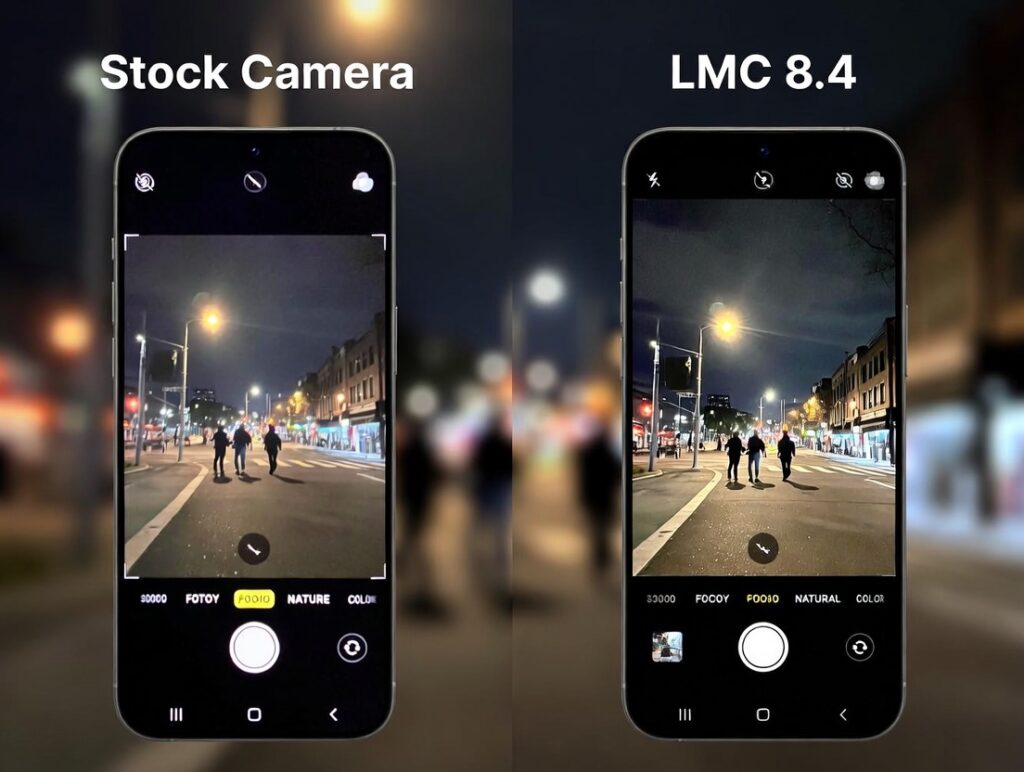
Low-light is where the difference is night and day—pun intended. Stock cameras on many phones struggle here, producing blurry or noisy images. LMC 8.4’s Night Sight mode captures more light, making indoor scenes clearer. In one test, a photo of a dimly lit room with the stock app showed dark corners and grain, but LMC 8.4 brightened it evenly, revealing textures on furniture.
Portraits tell a similar story. The stock app might blur hair edges awkwardly or miss the mark on skin tones. LMC 8.4 handles this with more precision, creating a natural bokeh effect—that soft background blur. Selfies come out smoother too, with better exposure on faces against bright backdrops.
For video, LMC 8.4 offers steadier footage thanks to enhanced stabilization. Recording a walk in the park, the stock app had some shakiness, while LMC 8.4 smoothed it out. Audio quality remains similar, as that’s more hardware-dependent.
What about special modes? Astrophotography isn’t always available on stock apps, but LMC 8.4 lets you point at the stars and wait a few minutes for a breathtaking result. It’s magical for hobbyists.
In portraits specifically, let’s zoom in. Taking a shot of a person against a busy background, the stock app sometimes includes unwanted elements in focus. LMC 8.4’s algorithms are smarter, isolating the subject cleanly.
Across tests, LMC 8.4 consistently edges out in quality, especially on non-Pixel devices. However, stock apps are faster for quick snaps, as LMC might take a second longer to process.
The Pros and Cons: Weighing Your Options
Like any app, LMC 8.4 has its upsides and downsides. On the positive side, the image quality boost is real—photos look more professional, with better colors and less noise. It’s free, customizable with configs, and works on a broad range of phones. If you’re into photography, the extra modes and controls open up creative possibilities.
Battery life isn’t hugely impacted, though intensive modes like astrophotography might drain it faster. Compatibility is strong, but some older phones might not support all features.
On the flip side, installation requires sideloading, which isn’t for everyone. There’s a learning curve if you’re new to manual settings. Occasionally, bugs pop up since it’s not official software—maybe a crash or unsupported lens. Also, updates depend on the community, so it’s not as seamless as stock app patches.
If your phone already has a top-tier camera, like recent flagships, the difference might be minimal. But for budget or mid-range devices, it’s a noticeable upgrade.
Final Thoughts: Should You Make the Switch?
After spending time with LMC 8.4, it’s clear this app can indeed outperform your stock camera in many ways. It unlocks potential in your phone’s hardware, delivering sharper, more vibrant photos and videos without needing fancy equipment. Whether you’re capturing family moments, travel adventures, or just daily life, the improvements in low light, portraits, and overall detail make it a compelling choice.
That said, it’s not for everyone. If you value simplicity and speed above all, stick with what’s built-in. But if you’re curious about better results and don’t mind a quick setup, give LMC 8.4 a shot. Download it, experiment, and see the difference for yourself. In the end, the best camera app is the one that helps you create memories that look as good as they feel.